"It has been half an hour since I sent it and Binance still shows zero." That is one of the moments most likely to rattle a beginner. On-chain transfers have no undo button, the balance on the sending side is already gone, and the receiving side sits empty, so of course nerves fray. Most "it has not arrived" cases turn out to be a false alarm, either the confirmations have not stacked up yet or you were looking in the wrong place. The thing that actually causes a loss is choosing the wrong network before you ever hit send. This guide lays out the correct steps and the way to track a deposit, so you feel sure before you transfer and calm while you wait.
By "deposit" this article means moving crypto you already hold into Binance from another exchange or wallet. If all you have is cash and no coins yet, that is a different route; see the P2P USDT buying guide.
Where do you find the deposit address?
The path is fixed: log in, go to Assets, tap Deposit, choose Deposit Crypto, pick the coin, then pick the network, and the page shows the address and QR code for that coin on that network. Paste the address into the withdrawal page on the sending side, or scan the QR code from the sending app; either works.
Two points get overlooked. First, the address is bound to the coin and the network together. In one account, your USDT address on the Tron network and your USDT address on Ethereum are completely different, and a BTC address is a different set again. Fetch a fresh address for the exact coin and network each time you deposit, and never reuse the address you got for coin A to receive coin B. Second, verify after you paste: check the first and last few characters of the address on the sending page against the one Binance shows, to confirm clipboard malware did not swap it. That five-second habit guards against a coin-losing accident.
Some coins also show a MEMO (also called a Tag) alongside the address on the deposit page; shared-address chains like XRP and EOS use it to tell users apart. If a MEMO appears, you must enter it exactly on the sending side. Fill in the address but skip the MEMO and the coins "reach the platform but not your account," and getting them back is a hassle.
Depositing needs a Binance account that has cleared identity verification. If you have not registered yet, start from the sign-up guide.
Picking the network: both sides must match
The network you choose on the sending side must exactly match the network you chose on the Binance deposit page. Match, and the coins land in minutes to tens of minutes. Mismatch, and at best it stalls into a recovery process, at worst it is lost for good. This is the one place in the whole deposit where an irreversible loss is possible, so slow down here.
Take USDT, the most common case. It exists on several networks at once, and the names look confusingly alike:
| Network | Underlying chain | Protocol trait | Fee level |
|---|---|---|---|
| TRC20 | Tron (TRON) | A block roughly every 3 seconds, so transfers feel fast | Usually very low |
| ERC20 | Ethereum | A block slot about every 12 seconds, queues when congested | Varies with gas, clearly pricier when busy |
| BEP20 | BNB Chain | Fast blocks, cost sits between the other two | Low |
Which one? The answer is not set by your preference but by what both sides support. Check which networks the sending side can send from, check which networks Binance has open for that coin on the deposit page, and from the overlap take the one that is cheap and fast. For USDT, when both sides support it, TRC20 is often the cheaper pick; but if the receiving side only gave an ERC20 address, ERC20 is your only option.
If you do pick wrong, even a network Binance happens to support for that coin does not guarantee you get the coins back. A wait may bring it in, or a self-service recovery request may work, but neither is guaranteed and Self-Service Recovery in the Help Center is the place to start; if Binance does not support that coin on that network at all, the coins may land at an address no one holds the private key for, and then they cannot be retrieved. "Possibly lost forever" is not scare talk, it is the plain rule of on-chain transfers. Check the network name character by character before you send, and do not begrudge the effort.
Deposit not arrived? Check in this order
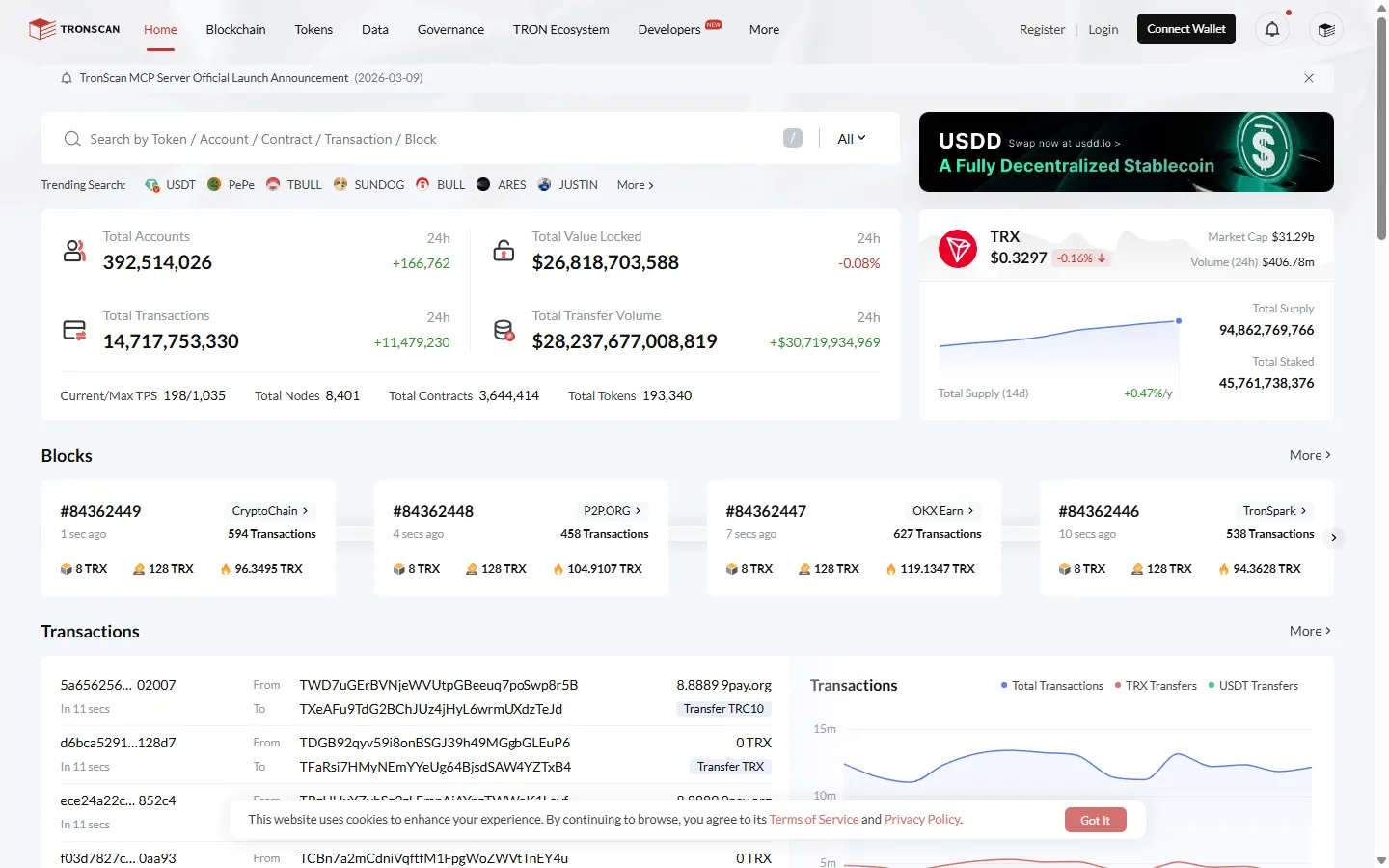
When a deposit is missing, do one thing first: find the transaction hash for it in the sending side's withdrawal history (it goes by TxID, tx hash, or transaction ID), and take it to the block explorer for that network to read the on-chain status. The on-chain status decides whether to wait or to go find someone.
- Confirm the sending side really sent it: exchange withdrawals usually go through an internal review, so a "processing" status means the coins are not on chain yet, and rushing helps nothing because the hash does not even exist.
- Read the on-chain status by hash: for the Tron network use Tronscan, for Ethereum use Etherscan, and paste the hash into the search box. If the status is pending, keep waiting; if it is success, move to the next step.
- Check the confirmation count: on-chain success does not equal credited on Binance. Every coin has a required number of network confirmations before Binance credits it, shown on the deposit page and in the deposit record, so if it asks for several confirmations, you wait for the blocks to stack up. Until the count is met, the record shows in progress, which is normal.
- Confirmations met and still nothing: go back and re-check that the address, network, and MEMO were all correct. If they were, start Self-Service Recovery in the Binance Help Center with the transaction hash; if that route cannot handle it, open live chat in the app (support icon, then Get Support, then Unresolved) and ask an agent to look up the internal crediting status by hash.
From running the flow ourselves, a deposit that has not arrived usually traces back to one of two spots: step 1, the sending side has not released it, or step 3, the confirmations have not stacked up. Start your check there. Cases that truly need a human are rare, so do not go hunting for "support" the second a deposit is late, and above all ignore anyone who messages you first offering to "speed up" arrival. That is a scammer, and the tactics are pulled apart in the scam prevention guide.
Minimum deposits and the reality of recovery
Every coin on every network has a minimum deposit amount, and a transfer below it will not credit and usually will not be refunded. That figure sits right under the address on the deposit page, so glance at it before you send, especially if you plan a small test first, since the test also has to clear the minimum to mean anything.
Now for "can I get it back if I sent it wrong." There is no single answer, only a few common cases: right address but wrong network, forgotten MEMO, or a coin Binance does not support. Binance's Help Center has Self-Service Recovery, and its May 2026 rules are: a deposit that succeeded on-chain to the right address and network but never credited is free and takes about 5 business days; a missing or wrong MEMO/Tag takes about 7 business days and costs a network fee; a coin Binance has not listed takes about 30 business days and costs 20 USDT; withdrawals, deposits to someone else's account, and requests filed on someone else's behalf are not accepted. You submit the transaction hash either way. Some cases cannot be recovered at all, such as coins that landed at a contract address no one holds the key to, and any third party claiming to "recover coins for a fee" is a scam. If a transfer of yours is already stuck, the checks to run, in order, are in our wrong-network guide.
Recovery is damage control, and it costs far more than three checks made beforehand, verifying the address ends, the network, and the MEMO. Turn those into muscle memory and depositing becomes a dull routine, and dull, when it comes to transfers, is the best state there is.
Once the coins arrive, what next? To swap them for Bitcoin, see how to buy Bitcoin; to understand the order screen, see spot trading basics. And when you eventually move coins back out, the flow is in the withdrawal guide, which is the exact mirror of depositing.
Frequently asked questions
Are there fees to deposit crypto to Binance?
Binance does not charge on the receiving side, but the sending side does. Withdrawing from another exchange costs that exchange's withdrawal fee, and sending from a wallet costs the on-chain network fee. The same coin on different networks can differ by an order of magnitude, and the sending side's withdrawal page shows the fee as soon as you pick a network.
How long does a deposit usually take?
It depends on the network and the confirmation requirement. Fast-block chains like Tron often arrive within minutes; Ethereum in normal conditions is usually minutes to tens of minutes. Congestion or a high confirmation requirement makes it longer, and you can track progress by taking the transaction hash to a block explorer.
Do deposit addresses change, and can I reuse an old one?
For the same account, coin, and network, a deposit address is generally valid long term, and an old one usually still works. But a wallet upgrade on the platform can change the address, so the safe habit is to reopen the deposit page and copy the latest address every time rather than relying on a saved old record.
Can I recover crypto sent on the wrong network?
It depends on the case, and none of it is guaranteed. Even if Binance supports the coin on the network you used, arrival is not certain and may need a self-service recovery request that carries a fee and takes time; if it does not support that coin on that network, the coins may be technically unrecoverable. Start with Self-Service Recovery in the Binance Help Center and submit the transaction hash; a deposit of a coin Binance has not listed takes about 30 business days and costs 20 USDT.
What is the MEMO or Tag at deposit, and what if I forget it?
Some coins on shared-address chains such as XRP and EOS use a MEMO or Tag to tell users apart under one address. If the deposit page asks for it, you must enter it exactly. Forget it or get it wrong and the coins reach the platform but cannot be matched to your account, so search the Binance Help Center for Self-Service Recovery and submit the transaction hash; a missing or wrong MEMO usually takes about 7 business days and costs a network fee.
The rules of on-chain transfers are cold, but they treat everyone the same: check, and you are safe; skip the check, and you are gambling. May every deposit you make arrive as dully and smoothly as this one.