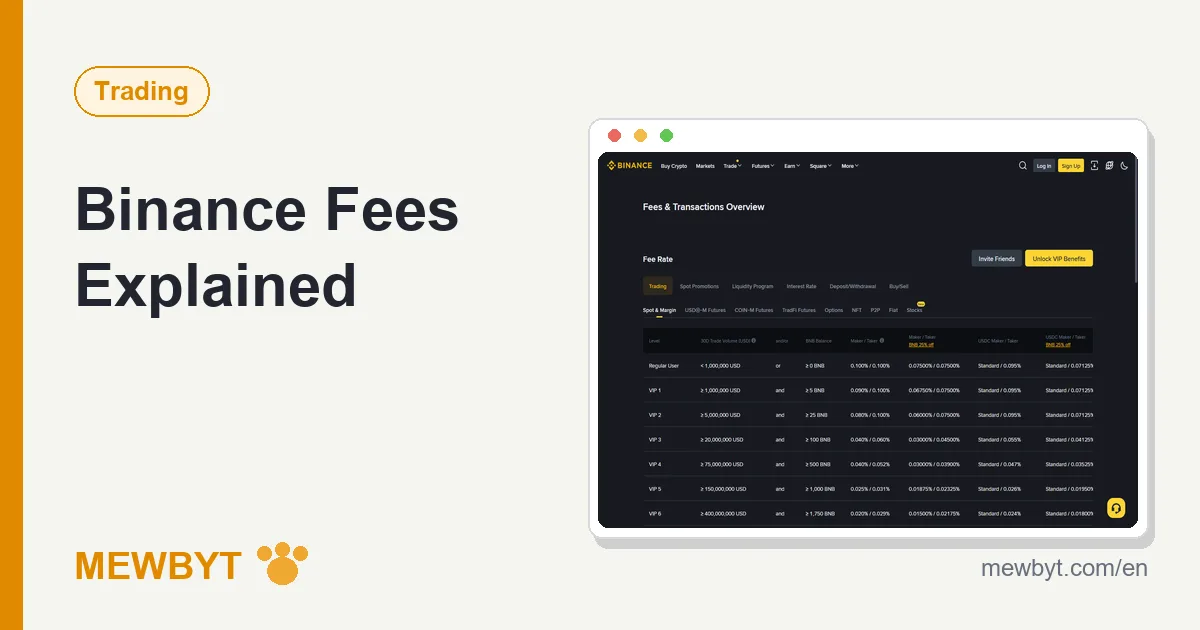
Losing money to the market is at least a fair fight. Losing it to fees is entirely self-inflicted. In our first year of trading we never switched on the BNB discount and never entered a referral code at sign-up, and when we exported the year's trade history and added up the fees, the overpaid portion would have covered a decent phone. Nearly all of it could have been avoided with two minutes of setup on day one.
This guide walks through every place Binance charges money, one by one: spot, futures, deposits, withdrawals, and P2P, covering what each costs, how it is charged, and where it can be trimmed. One note on sourcing before anything else: the rates in this article were checked in September 2026 against the Binance fee page and Help Center, and the rate that applies to your own account right now is shown under Fee Level on the spot trade page.
What kinds of fees does Binance charge?
Four kinds cover what a regular user will actually meet: spot trading fees, futures trading fees, flat withdrawal fees, and the hidden spread inside P2P prices. Depositing crypto costs nothing at all. The table below is the whole map; the rest of the article walks it section by section.
| Where | How it is charged | Typical level for a regular user | Can it be reduced? |
|---|---|---|---|
| Spot trading | Percentage of the filled amount, split into maker and taker | The 0.1% tier | Yes: BNB discount plus referral rebate |
| Futures trading | Percentage of the leveraged notional position | Base rate lower than spot | Yes: referral rebate |
| Deposits | Free | 0 | Nothing to reduce |
| Withdrawals | Flat fee per coin and network | Varies widely by network | Yes: pick cheaper networks, withdraw less often |
| P2P trading | No fee on the user side | 0, with the spread as a hidden cost | Yes: compare several merchants' quotes |
We will take these in order of how hard they hit a typical wallet. For most people the spot fee is the biggest line, so it goes first.
Spot fees: what does 0.1% actually mean?
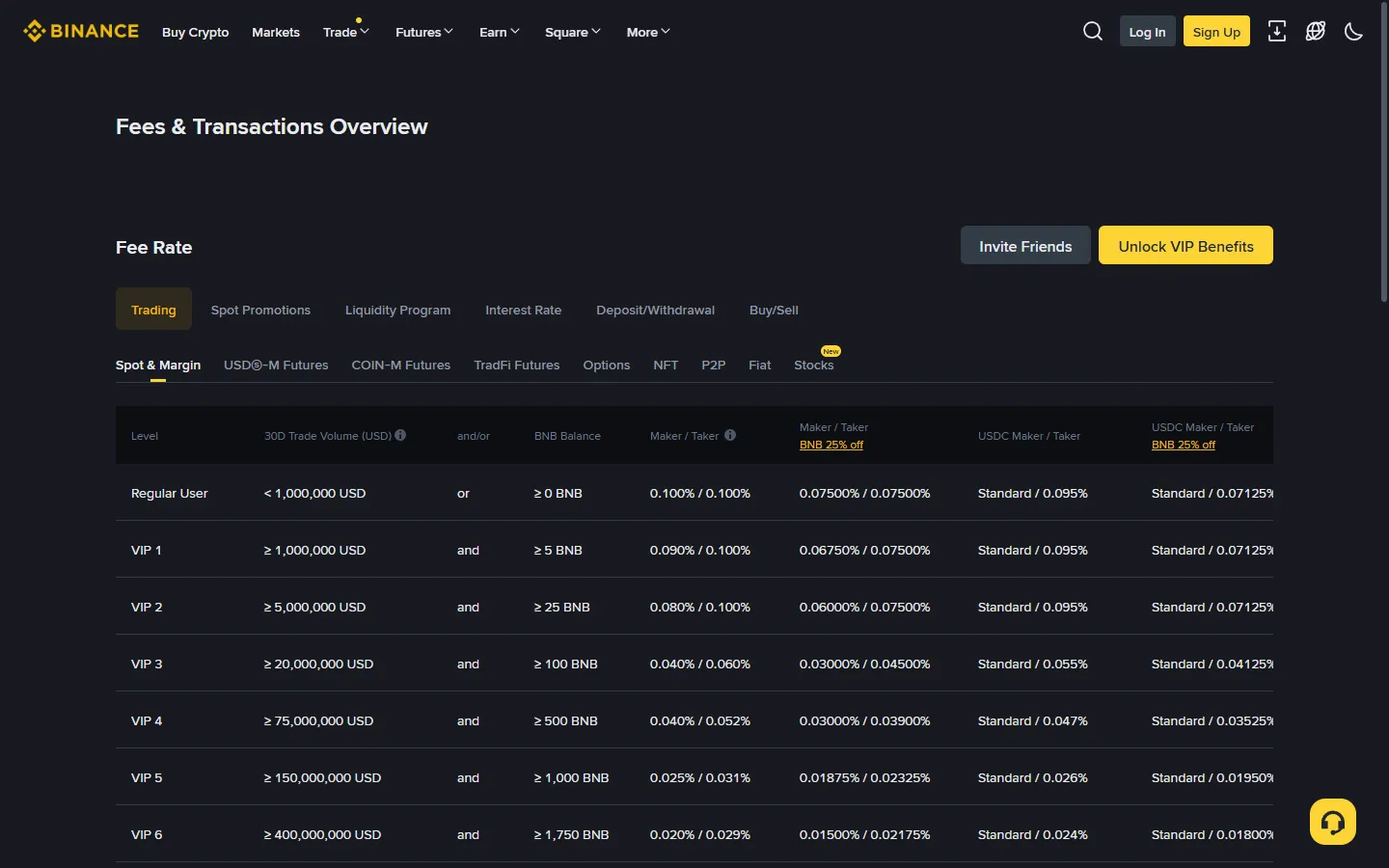
The number first: regular users pay 0.1% as both maker and taker on spot (checked September 2026). Concretely, a fill worth 1,000 USDT costs about 1 USDT in fees. That sounds small, and per trade it is; the ways it stops being small are what the rest of this section is about.
Beyond the headline number, three details tend to get missed:
- It is charged on the filled amount, once on each side. Buying 1,000 USDT of BTC costs a fee, and selling that BTC later costs another one on the sale amount. A round trip adds up to roughly 0.2%, and a few round trips a month quietly stack into a real cost.
- It is deducted from the asset you receive. Buy BTC and a sliver of BTC is withheld; sell BTC back into USDT and a sliver of USDT is. That is why the received amount in your trade history always sits a touch below the ordered amount. With the BNB discount switched on, fees come out of your BNB balance instead.
- Maker and taker are roles, not products. Place a limit order that rests in the order book waiting for someone to match it and you are the maker. Take an existing order off the book for an instant fill and you are the taker. At the regular tier both cost the same, but the higher tiers usually favour makers, because exchanges like rewarding the people who supply the book with liquidity.
To make the round-trip point concrete: suppose you buy 1,000 USDT of BTC, the price does not move at all, and you sell it back. The buy costs about 1 USDT and the sell about another 1 USDT, so you are roughly 2 USDT down on a perfectly flat market. Every trade starts life slightly under water, and the more often you flip positions, the more of your results the fee line quietly eats. None of that makes the fee unfair; it makes casual overtrading expensive.
Build one habit early: after any fill, open the trade detail and read the fee line. Thirty seconds per trade is the cheapest fee education available, and it keeps everything in this article from staying theoretical.
VIP tiers: does a regular user need to care?
Mostly no, but here is the mechanism in one sentence so you can judge for yourself: Binance sorts accounts into tiers based on 30-day trading volume and the amount of BNB held, and each step up lowers the rate, with makers usually getting the bigger cut. Both conditions have to be met, not either one: even the lowest tier, VIP 1, needs at least 1 million US dollars of spot volume over the last 30 days and at least 5 BNB held in the account. Higher tiers multiply those thresholds, and the full table is on the fee page.
Should you care in practice? Almost certainly not. The monthly volume behind even the first VIP tier is an astronomical figure for an individual, and the overwhelming majority of retail users will sit at the regular tier indefinitely. That is normal. What deserves an explicit warning is the reverse move: do not churn trades to climb tiers. The fees paid generating artificial volume are all but guaranteed to exceed whatever the higher tier would save, and that arithmetic does not improve at any scale.
The two fee levers a regular user can actually reach are the next two sections: the BNB discount and the referral rebate. Neither depends on volume, both are open to everyone, and they stack.
The BNB discount: how do you get 25% off?
The answer is a toggle: hold some BNB in your account and switch on the setting that pays fees with BNB, and spot fees drop by 25%, from 0.1% to 0.075%. One switch, lasting effect.
The mechanics are simple. With the toggle on, fees stop being carved out of the coins in each trade and are paid from your BNB balance instead, and Binance prices that payment route at a discount. The switch is under Fee Level on the web spot trade page; in the app it is Account Center, then Settings, then BNB Discount.
Three things to know before relying on it:
- The discount only applies while there is actually BNB in the account. If the balance runs dry, the fee quietly falls back to being taken from the traded coin at the full rate. Buying a small amount of BNB and leaving it parked for this purpose is the usual pattern.
- BNB is a volatile asset in its own right, and holding it means carrying its price swings. The amount needed for fee payment is small, so the exposure is limited, but it is not zero and you should know it exists.
- Confirm the toggle with your own eyes rather than assuming it is on. We know someone who traded for half a year before discovering the switch had never been flipped. That someone was us.
Is buying BNB purely for the discount worth the bother? For anyone trading more than occasionally, usually yes: the discount pays back the small holding quickly, and the leftover BNB stays yours. For someone making one or two small trades a year, the saving is pennies and the setup can be skipped without guilt. The aim of this article is not to squeeze every last setting, but to know what each one costs and what it buys.
How does the referral rebate stack with the BNB discount?
They stack, and the order is discount first, rebate second: the fee is first cut to 75% of the base rate by BNB payment, and the rebate is then applied to that already discounted amount. The two mechanisms settle independently, and neither crowds the other out.
Run the numbers end to end: the spot base rate is 0.1%, the BNB discount brings it to 0.075%, and the rebate on top, taken at its ceiling of about a fifth, lands the effective cost at roughly 0.06%, about 40% below the sticker rate. That is the lowest-cost combination a regular user can reach without churning volume or chasing VIP tiers, and both halves of it are set up once and left alone.
The rebate has one precondition: a referral code on the account, such as the one shown on our homepage. It is easiest to attach at registration; later, only a verified account left dormant for 180 days can rebind one. How the rebate works under the hood, where to confirm it took effect, and the usual misconceptions are all in the referral code breakdown.
How do futures fees differ from spot?
Two differences matter: the rate, and the base it is charged on. Regular users on USDT-margined futures pay 0.02% as maker and 0.05% as taker (per Binance's futures fee FAQ, updated May 2026), with a further 10% off when fees are paid in BNB, but the fee is calculated on the leveraged notional position, not on the margin you put up.
The second point is where beginners get caught. Open a position with 1,000 USDT of margin at 10x leverage and the notional position is 10,000 USDT, so the fee is charged on 10,000. The rate looks several times cheaper than spot, but the base has grown ten times, and after both the open and the close are charged, the money out of pocket can easily exceed what the same capital would have paid on spot. The more often you trade, the wider that gap grows. The idea that futures fees are cheap comes from reading the rate and ignoring the base.
Futures also carry a cost that is not a fee at all: the funding rate. Binance does not collect it; it is a payment that flows between long and short holders on a fixed cycle, with the direction and size shifting with the market, always shown live on the contract page. Each settlement looks tiny, but it is calculated on the notional position and repeats several times a day, and a position held open for weeks can quietly pay more in funding than in fees. The full risk machinery of futures, liquidation, forced closes, isolated versus cross margin, lives in Futures & Risks; read that before touching the product.
What do P2P, deposits, and withdrawals cost?
P2P charges regular buyers and sellers nothing, deposits are free, and withdrawals cost a flat fee per coin and network. Each deserves a closer look.
P2P: the platform adds no fee on the user side, so the price a merchant quotes is the price you settle at. But no fee is not the same as no cost. The merchant's margin is built into the quote, and at any given moment different merchants can price USDT a few cents apart, which on a larger purchase is real money. Flipping through a page or two of quotes before committing is the single most practical saving in P2P, and how to pick merchants safely is covered in the P2P USDT buying guide.
Deposits: Binance charges nothing for crypto arriving. What you actually pay sits on the sending side: the withdrawal fee of the platform the funds leave, or the network fee on a wallet transfer. That cost exists the moment you press send over there, and none of it goes to Binance. Details are in the deposit guide.
Withdrawals: the most underestimated line on the whole bill. The fee is a flat amount set per coin and per network, with no relation to the size of the withdrawal: 100 USDT and 10,000 USDT sent over the same network pay exactly the same. Two conclusions follow directly. Small, frequent withdrawals are the most expensive pattern, so batch them whenever you can. And the same coin can cost dramatically different amounts on different networks, sometimes an order of magnitude apart, so compare the listed fees on the withdrawal page before choosing. The longer version is in the withdrawal guide.
What are the four practical ways to pay less?
Pulling the whole article into a checklist, ranked by return on effort, gives four moves:
- Enter a referral code at sign-up. Bound once, effective for the life of the account, with up to about a fifth off trading fees. It costs the least time of anything on this list, and it is the only item with a deadline: do it at sign-up, because a later rebind needs the account to sit dormant for 180 days.
- Switch on the BNB discount. Buy a small amount of BNB, flip the toggle, and spot fees drop 25% immediately. Stacked with the rebate, you trade at roughly 60% of the sticker rate.
- Choose withdrawal networks deliberately and withdraw less often. Under a flat-fee model, letting balances accumulate before withdrawing and picking the cheaper network can save more over a year than every basis point you ever shaved off trading rates.
- Rein in your trading frequency. Every round trip is charged on both sides, and frequent rebalancing costs far more than intuition suggests. The bluntest fee optimization available is simply placing fewer orders.
To see what these numbers mean for your own pattern, put a trade size and a monthly frequency into our Spot Fee Calculator. It lays out the annual difference between discount on and off, rebate and no rebate, side by side, and one glance at your own figure beats any paragraph of ours.
One move deliberately not on the list: hopping platforms to chase zero-fee promotions. Exchanges run them from time to time, and they are real while they last, but they end, and money scattered across platforms to follow them costs attention and picks up transfer fees on the way back. For a beginner, the four moves above capture most of the available saving with none of the churn.
Fees are the certain small money, and trading decisions are the uncertain big money. Once the avoidable costs are trimmed, do not let the lower rate talk you into trading more. That would be optimizing the pennies while ruining the pounds.
Frequently asked questions
What are Binance's spot trading fees?
Regular users pay 0.1% as both maker and taker (checked September 2026), and your own account's current rate is shown under Fee Level on the trade page. Turning on the BNB discount lowers that to 0.075%, and stacking the referral rebate on top (at its ceiling of about a fifth) brings the effective rate to roughly 0.06%. The live figure on Binance's fee page is always the authority.
Can the BNB discount and the referral rebate be used at the same time?
Yes, they stack. The order is discount first, rebate second: the fee is first cut by 25% through BNB payment, then the rebate is applied to the already discounted amount. One is a payment discount and the other a rebate mechanism, so they run independently without crowding each other out.
Does Binance charge a fee for deposits?
No. Moving crypto into Binance is free. The cost sits on the sending side instead: the withdrawal fee charged by the platform you are sending from, or the network fee on a wallet transfer. That money is paid the moment the funds leave the other side, and none of it goes to Binance.
How are Binance withdrawal fees calculated?
As a flat amount per coin and per network, unrelated to how much you withdraw: sending 100 USDT and sending 10,000 USDT over the same network costs exactly the same. The same coin can cost very different amounts on different networks, so compare the options on the withdrawal page before you confirm.
Can an existing account add a referral code later to get the rebate?
Not while it is in use. Only a verified account that has been dormant for 180 days can rebind a code, by logging in through a referral link. An account already in use can still turn on the BNB discount, batch its withdrawals onto cheaper networks, and trade less often, none of which depend on a code.
Rates begin aging the moment anyone writes them down. The numbers here are from September 2026. Before acting, spend half a minute on Fee Level in the trade page to see your account's actual rate, and if it differs from this article, work from the number you see. If you spot something here that has gone stale, write to mewbyt@mewbyt.com and we will correct it.
Sources
You can check the rates above in these places: