Binance Convert lets you swap one coin for another without touching an order book: pick the two assets, type an amount, look at the quote, confirm. There is no separate trading fee, but the price comes from Binance and can differ from what the spot market is showing at that moment, and that difference is your real cost. For small, one-off swaps, Convert is the easy option. For bigger or frequent trades, check it against the spot price first. Since 29 September 2026, everything you convert lands in your Spot account. Below: how to read the cost, how to compare it with spot, the three order types, minimums, and how to clear out small leftover balances.
What Convert is and where to find it
Binance's how-to page (updated 2 September 2026) calls Convert a simple tool to buy or sell crypto in a few clicks, covering more than 7,000 pairs including fiat, from as little as about 0.01 USD. Compared with spot trading, it skips the order book and the choice between limit and market orders and simply gives you one price.
- Website: log in and go to Trade → Convert & Block Trade. There is also an entry point on your Spot account page.
- App: Binance's guide says to tap Trade on the home screen and use the Convert option. The exact placement varies between app versions; if you cannot see it, search for "Convert" in the search bar at the top of the home screen.
You need a verified account to use Convert; the FAQ lists identity verification as a prerequisite. If you are starting from scratch, begin with the registration guide.
Is there a fee? The cost is in the quote
Question 8 of the Binance Convert FAQ deals with exactly this. Convert pricing does not include traditional trading fees. In Instant Mode the quote is set dynamically based on market conditions and other factors, so it can differ from other markets, including Binance Spot. The amount shown when you preview the conversion is the amount you receive, with no further fees. The quote is locked for a short time so you can review it, then refreshes automatically.
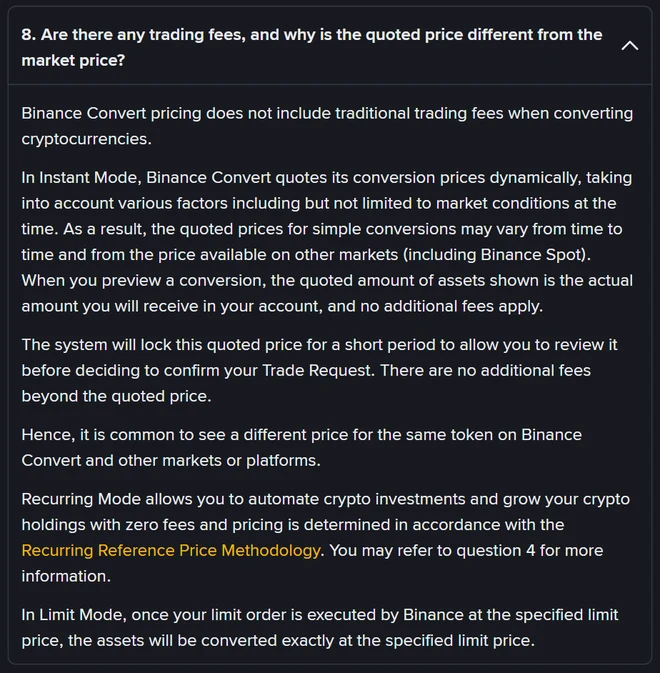
The how-to page puts it more plainly: the conversion price is an off-market price that Binance provides for its own account. You are not matching with another user's order; you are accepting a price from Binance. Binance does not say how far that price sits from spot, and the FAQ never uses the word "spread". In practice, the gap between what Convert gives you and what the spot price would give you is the cost of using it. Sometimes it is smaller than the spot fee, sometimes larger, which is why it is worth checking.
Convert or spot: how to check before you confirm
Spot fees are published. On Binance's fee schedule, a regular VIP 0 user pays 0.1% as maker or taker, or 0.075% with the BNB fee discount switched on (a 25% discount). Spot fees are taken from the coin you receive. So the comparison goes like this:
- Enter your amount in Convert and tap Preview. Note the amount you will receive.
- Open the spot page for the same pair. Take the last price and work out amount ÷ price × (1 − 0.1%), or use 0.075% if you pay fees in BNB.
- Compare the two. Use whichever gives you more. The Convert quote refreshes after a short while, so do this quickly.
A made-up example to show the arithmetic (not live prices): you spend 1,000 USDT on BTC and the spot price is 100,000 USDT.
| Route | Calculation | BTC received |
|---|---|---|
| Spot market order, no BNB discount | 1,000 ÷ 100,000 × (1 − 0.1%) | 0.00999 |
| Spot with BNB discount | You get 0.01 BTC; about 0.75 USDT worth of BNB is charged separately | 0.01 (plus BNB fee) |
| Convert quote A | Shown in preview | 0.009985 (less than spot; spot wins) |
| Convert quote B | Shown in preview | 0.009995 (more than spot; Convert wins) |
A few things can change the answer. A spot market order on a thinly traded coin can slip well past the last price, and a single Convert quote avoids that. Binance's how-to page says large orders can get more competitive quotes on Convert than on the spot market. Convert volume also counts toward your VIP spot trading volume (token swaps excepted), added the next day. For placing spot orders see the spot trading tutorial, and for the full fee arithmetic see Binance fees explained.
Instant, limit and recurring orders
The Convert page has three tabs, which question 3 of the FAQ explains:
| Mode | How it fills | Watch out for |
|---|---|---|
| Instant | Converts straight away at the quoted price | The quote refreshes after a short time; what you get is the previewed amount |
| Limit | Converts at the price you set, which Binance can execute at any time before expiry | No guarantee of a fill, even if the market price reaches or passes your limit; the funds are locked while the order is open |
| Recurring | Buys automatically on a schedule | Every 1, 4, 8 or 12 hours, daily, weekly, every two weeks or monthly; the FAQ says zero fees, with prices set by Binance's Recurring Reference Price Methodology rather than the spot price |
You choose how long a limit order stays open when you place it; on the website it is the "Expires in x days" dropdown. Binance's example uses 30 days: if the order has not been executed at your price within 30 days, it is cancelled automatically. The help centre does not list every option, while Binance's API documentation lists 1, 3, 7 and 30 days; pick from whatever your order screen shows.
Limit orders also have an option to keep earning: according to the help centre, if you tick it, the locked funds sit in Simple Earn Flexible and earn interest while the order is open; if you do not, they stay frozen in Spot without interest. Convert also supports take-profit and stop-loss orders, covered in question 5 of the FAQ.
Minimums, maximums and large orders
- Minimum: the how-to page says from about 0.01 USD.
- Maximum: question 13 of the FAQ says both limits depend on the pair, and you can see them before entering an amount. Binance does not publish a single table of maximums.
- Large orders: question 16 says orders above the instant settlement limit are split and settled progressively, and you can cancel only the part that has not settled yet. Normal orders usually settle immediately, occasionally taking up to a few hours.
If you are in the European Economic Area, the top of the FAQ carries a notice that, under MiCA, unauthorised stablecoins are subject to restrictions for EEA users. Check the on-screen notices before converting into or out of a stablecoin.
Which account pays and where the coins land
This changed in September 2026. Binance announced the Funding account migration on 23 September, and the accompanying FAQ says that from 29 September all Convert orders stop settling to the Funding account and settle to Spot instead. In detail:
- Instant conversions: the coins you receive go to your Spot account.
- Limit orders, including take-profit and stop-loss: new orders placed after 29 September lock and settle in Spot only. Older orders locked in Funding are not cancelled; they settle to Spot when filled or when they expire.
- Recurring plans: settle to Spot or Earn as set in the plan, with failed debits refunded to Spot. Binance recommends switching any plan that uses the Funding account to Spot.
- Stocks account: the Funding account will be renamed the Stocks account, and Convert inside it has been disabled; use Convert from Spot.
On the paying side, the pre-migration help pages said you could tick Spot, Funding and Flexible Earn as sources, debited in that order. The migration notice only says settlement no longer uses Funding; it does not say whether Funding can still be debited. The safe approach is to move the coins you want to convert into Spot first. If you still have a Funding balance, see the section on what happens after a P2P purchase.
Turning dust into BNB: small-balance conversion
Most accounts end up with a few coins worth a dollar or two that are too small to sell or withdraw. The tool for those is not Convert but "Convert Small Balance" on the Assets page. Binance's help centre (updated 5 August 2026) gives the current rules:
- Tokens worth less than 20 USDT can be converted into BNB, BTC, ETH, USDT, USDC and similar targets; the page shows which ones are available to you.
- You can use it once every hour.
- There is a flat 2% fee, or 10% for Alpha tokens.
- The result goes to your Spot account, and dust in Spot, Funding and Alpha accounts all qualifies.
- The conversion stops if the price moves by 5% or more during the process; delisted or unlisted tokens cannot be converted.
Path: on the website, Assets → Spot → Convert Small Balance; in the app, Assets → Spot → Convert Small Balance. Older articles mention a 0.001 BTC threshold and a six-hour wait; those rules have been replaced by the ones above.
Where to find your Convert history
Question 14 of the FAQ: on the website, go to Orders → Convert History. Each search covers up to 90 days, and you can go back several years. In the app, open the Assets tab at the bottom (called Portfolio in newer versions) and tap the transaction history icon in the top-right corner to see completed and cancelled orders. Recurring purchases have their own history under the same section. Small-balance conversions are listed separately, in the history on the small-balance page itself.
When to use Convert and when to use spot
| Your situation | Suggestion |
|---|---|
| First purchase, small amount, no interest in order books | Convert; check the preview amount before you confirm |
| Swapping a thinly traded coin | Convert's single price often beats a spot market order's slippage; compare first |
| Trading often or in larger amounts | Compare every time; spot with the BNB discount is often cheaper, though Convert can win on large orders |
| Want to wait for a specific price | A spot limit order is more transparent; Convert limit orders are not guaranteed to fill |
| Want to buy a little every week or month | Convert recurring orders |
| A pile of coins worth a few dollars each | Small-balance conversion |
Whichever route you take, make sure the coin is in your Spot account before you start and check Spot afterwards. If you then want to move the coins out or cash them out, carry on with withdrawing and cashing out.
Frequently asked questions
Does Binance Convert charge a fee?
Not a separate one. The Binance Convert FAQ says Convert pricing does not include traditional trading fees, and the amount shown in the preview is exactly what lands in your account. The quote itself is set dynamically by Binance and can differ from the spot price, so the cost is built into the quote. Compare it with the spot price before you confirm.
Is Binance Convert cheaper than spot trading?
It depends on the size and the pair. A regular (VIP 0) spot trade costs 0.1%, or 0.075% if you pay fees in BNB; Convert has no fee but its quote can be worse or better than spot. Put the amount you would receive from the Convert preview next to the spot price minus the fee, and use whichever gives you more. Binance also notes that large orders can get more competitive quotes on Convert than on spot.
What is the minimum amount on Binance Convert?
Binance says you can convert from as little as about 0.01 USD. Minimum and maximum amounts depend on the pair, and the page shows the limits before you enter an amount. Orders above the instant settlement limit are split and settled progressively.
Which account does Convert settle to?
Since 29 September 2026, all Convert orders settle to your Spot account rather than the Funding account. Limit orders that were already locked in Funding are not cancelled; they settle to Spot when filled or when they expire. Convert inside the Stocks account has been disabled.
What is the difference between converting small balances and Convert?
Small-balance conversion is a separate tool on the Assets page that sweeps tokens worth under 20 USDT into BNB, BTC, ETH, USDT, USDC and similar targets. You can use it once an hour, it charges a flat 2% fee (10% for Alpha tokens), and the result goes to your Spot account. Convert swaps any supported pair at a quoted price with no separate fee.
Sources
Public pages cited in this article, verifiable yourself:
- Binance Help Center: FAQ on Binance Convert (Q3 order modes, Q8 no traditional trading fees, Q13 limits, Q14 history, Q16 progressive settlement, Q17 VIP volume, EEA stablecoin notice) (published 19 August 2022, updated April 2026)
- Binance Help Center: How to Use Binance Convert (entry points, 7,000+ pairs, minimum about 0.01 USD, off-market quotes, large orders, limit order expiry) (updated 2 September 2026)
- Binance announcement: Funding account to be renamed Stocks account; crypto balances migrated to Spot (published 23 September 2026)
- Binance Help Center: FAQ on the Funding to Spot account migration (Convert settles to Spot, limit and recurring orders, Convert disabled in the Stocks account) (updated 24 September 2026)
- Binance Help Center: the keep-earning option for Convert limit orders (updated 20 April 2026)
- Binance Help Center: How to Convert Small Account Balance (under 20 USDT, once an hour, 2% fee, credited to Spot) (updated 5 August 2026)
- Binance spot trading fee schedule (VIP 0 at 0.1%, 0.075% with BNB) (undated page)
- Binance API documentation: Convert limit order expiry values (1, 3, 7 and 30 days) (undated page)
All pages above were checked on 19 October 2026.