Anyone who has made a first deposit knows the screen. The coins have left the other wallet, the deposit page says it is waiting for network confirmations, 1/12, and then for a while nothing seems to happen. Once you know what that counter is counting, you can tell a transfer that is simply queued from one that has actually gone wrong, and most of the worry goes away with it.
Queue, seal, seal again: what a confirmation is
Picture the blockchain as a public ledger that gets a new page every so often. The network collects the transfers waiting in line, writes them onto the next page, called a block, and seals it. The moment your transfer lands on a page, it has one confirmation, and every page sealed after that adds another. Each new block also carries a fingerprint of the block before it, so rewriting an old page would mean redoing every page stacked on top of it, and the rest of the network would notice at once. Ethereum's developer documentation describes blocks in just these terms, as batches of transactions linked by the hash of the previous block.
Why count pages at all? Because the newest pages of the ledger can, in rare cases, be replaced by a competing version. The deeper your page sits under newer ones, the closer that chance gets to zero. When an exchange asks for 12 confirmations, it is really saying: we will credit your balance once the transfer is buried deep enough that undoing it is no longer realistic.
Why one chain takes seconds and another takes an hour
How often a new page gets sealed is fixed by each network's protocol. Bitcoin produces a block roughly every ten minutes. Ethereum runs on slots of about twelve seconds. Tron seals a block about every three seconds. Put those rhythms next to the different confirmation counts each platform sets for each network, and arrival times end up orders of magnitude apart. On a fast chain a deposit can feel almost instant; on a slow one at a busy hour it can take most of an hour with nothing wrong at all.
So when a transfer feels slow, the answer is usually not a fault. The network you picked simply runs at that speed, and the platform is waiting for the number of confirmations it considers safe for that network. Both are normally shown on the deposit page, right next to the network name, and worth a glance before you choose.
Where the transaction hash lives, and when there isn't one
Everything starts with the transaction hash, which different apps call TxID, Tx Hash, or transaction ID. You find it on the sending side. On another exchange, open the withdrawal history and tap the withdrawal. In a self-custody wallet such as MetaMask or Trust Wallet, open the activity list and tap the transfer; most wallets add a link that opens it straight in the right explorer, which saves you the next step.
No hash usually means one of two things. The sending exchange may still list the withdrawal as processing, because it runs its own checks before broadcasting anything, and until it broadcasts there is nothing on any chain to look up. Or both accounts sit on the same platform, in which case many exchanges settle the transfer on their own books, mark it as an internal transfer, and never touch the blockchain at all.
Once you have the hash, paste it into the explorer for the network named in the withdrawal record: Etherscan for Ethereum (ERC20), BscScan for BNB Smart Chain (BEP20), Tronscan for Tron (TRC20), mempool.space for Bitcoin, Solscan for Solana. Layer-2 networks such as Arbitrum, Base, and Optimism each run their own explorer too. A hash that starts with 0x only tells you it belongs to the Ethereum family. The same format is used on Ethereum, BNB Smart Chain, and every one of those layer-2s, and the wrong explorer will just report that it found nothing. Go by the network name in the record, not by the look of the hash.
Reading a real transaction page from top to bottom
Below is an ordinary withdrawal as Etherscan shows it: 22.96 USDT leaving a Binance hot wallet for a private address, captured on 11 September 2026. Withdraw USDT from an exchange to your own wallet over ERC20 and your page will have exactly these rows.
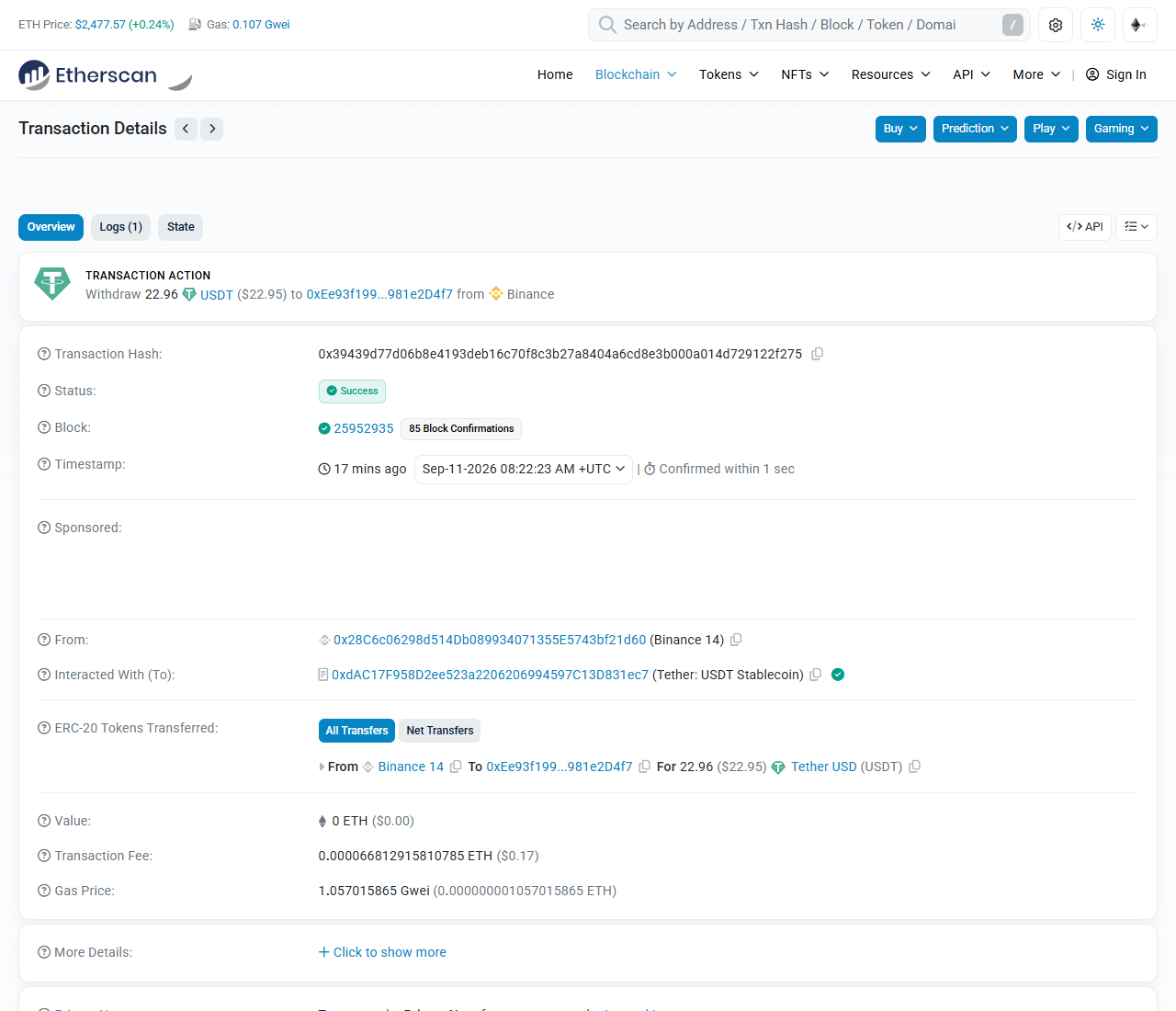
The line at the top, "Withdraw 22.96 USDT to 0xEe93f199...981e2D4f7 from Binance", is a summary Etherscan writes for you. It recognizes the sender because it keeps public labels for large exchange wallets, which is also why the From row says Binance 14. A personal wallet gets no label, only the bare address.
"Success" under Status means the transaction made it into a block and ran. While it is still waiting to be picked up, the same spot reads Pending. Failed means it was included but reverted: no tokens moved, and the sender paid the fee anyway. Waiting will not fix a failed withdrawal; the sender has to send it again.
Next to the block number is the counter you have been waiting on, "85 Block Confirmations". Compare it with the number your deposit page asks for. It rises by one with every new Ethereum block, roughly every twelve seconds, so if you open this transaction now the figure will be far higher. "Confirmed within 1 sec", beside the timestamp, describes how quickly the transaction got into a block, not how your platform is counting. The timestamp itself is in UTC, so convert it to your own time zone before you quote it to anyone.
Then comes the row that sends people into a panic. "Interacted With (To)" shows 0xdAC17F...831ec7, labeled Tether: USDT Stablecoin. That is the USDT token contract, not the person who received the money. A token transfer is a call asking the token's contract to move a balance from one address to another, so this row always shows the contract. The actual recipient is under "ERC-20 Tokens Transferred": from Binance 14, to 0xEe93f199...981e2D4f7, for 22.96 USDT. When you check whether a deposit went where it should, that is the address to hold against yours.
"Value: 0 ETH" is normal as well. It only counts ETH sent along with the call, and a USDT transfer usually sends none.
Last comes "Transaction Fee", about $0.17 in ETH, paid by the sender, which here is Binance. If you ever send USDT from your own wallet on Ethereum, you need a little ETH sitting next to it for exactly this. And whatever Binance charged its customer for the withdrawal comes from its own fee schedule and never appears on the chain. So when a withdrawal fee looks steep next to a $0.17 network fee, the gap is the exchange's pricing, not the blockchain's.
Waiting, chasing the sender, or opening a ticket
Once you have read the status and the confirmation count, you are in one of three situations:
- The confirmation count keeps rising. The transfer is on its way and needs nothing from you.
- The transaction shows as pending and has not made it into a block yet. The network is usually congested or the fee was set low, and it clears once traffic eases or the sender deals with it.
- The count passed the required number long ago and your balance still has not moved. The chain has done its part. The delay is in the platform's crediting step, which calls for a support ticket rather than more refreshing.
The full troubleshooting order, including the messier cases such as a wrong network or a missing memo, is in our guide to USDT sent on the wrong network.
When the stuck transfer is Bitcoin you sent yourself
Bitcoin has no fixed fee. Each transaction bids for room in the next block at so many satoshis per virtual byte, and miners take the best bids first. On a quiet day a low bid still gets in. On a busy one, a transaction with a stingy fee can sit for hours in the mempool, the waiting room for unconfirmed transactions. When we checked on 11 September 2026, Blockstream's explorer rated congestion as low and suggested 1 sat/vB, about as cheap as Bitcoin gets.
If the stuck transaction left your own wallet, you may have a way out. Many wallets have a speed-up or bump-fee button, which replaces the payment with a copy that pays a higher fee (replace-by-fee). A second technique, child-pays-for-parent, spends the unconfirmed coins onward with a generous fee so that miners take both together, but only whoever controls the receiving address or the change output can use it. An exchange deposit address belongs to the exchange, so as the sender, the fee bump is the lever you have. If your wallet offers neither, a transaction that stays unconfirmed long enough can eventually be dropped by the nodes holding it, and many wallets then show the coins as spendable again.
What to send support so they find it on the first try
If the count is well past the requirement and your balance still has not moved, the platform needs to check its own crediting records, and it searches them by hash. Put everything in the first message: the full TxID, copied rather than retyped; the coin and the network, for example USDT on ERC20; the amount that actually arrived on chain, which is what was sent minus the sending exchange's fee; your deposit address, plus the memo or tag if that coin uses one; the time, with its time zone; and a screenshot of the explorer page showing the status and the confirmations. Send it through the help center inside the app or on the official website. Anyone who messages you first offering to speed things up is not support.
Two things people get wrong
The first is waiting for extra confirmations to be on the safe side. The number a platform asks for already is its safety threshold. Once it is reached the deposit is credited, and waiting longer adds nothing. The reverse matters more: if a transfer is far past the required count and still has not been credited, the problem is not on the chain. Stop checking the explorer and open a ticket with the platform.
The second is paying someone to speed things up. Acceleration can only ever apply to a transaction you sent yourself that has not been picked up into a block yet, and only on networks that support it. When you are waiting for a deposit that someone else or an exchange sent to you, no outside service can make it arrive sooner, and anyone charging for that is best treated as a scammer. The one thing you control is choosing a faster network next time.
One distinction clears up most of the confusion: arrival happens in two layers. First the chain confirms the transfer, a public fact anyone can check. Then the platform records it in your account, an internal step only the platform can take. Nearly every confirmed-but-not-credited question is stuck in that second layer, and the key to it sits with the platform, not with the blockchain.
Two habits that follow from all this
Leave slack for money with a deadline. If a transfer has to land by a certain time, send it at least one busy period early instead of at the last minute. And do not treat anything as received until the confirmations are complete and the platform has credited it. There is an old trick where a buyer shows a screenshot of a transaction that has barely been broadcast and asks for the goods straight away; go by what your own account shows as credited, never by an image someone sends you. The step-by-step deposit flow on Binance, network screen included, is in our deposit guide.